Data loss prevention (DLP) is a cybersecurity strategy that identifies sensitive data, monitors how it’s used and shared, and prevents unauthorized access, transfer, or disclosure.
The average data breach costs $4.44 million. That figure comes from IBM’s 2025 Cost of a Data Breach Report, and it covers direct costs only. It doesn’t account for the customer trust you lose, the regulatory investigations that follow, or the months of remediation work your team absorbs.
That’s the context for understanding why data loss prevention has moved from a compliance checkbox to a core security priority. DLP is how organizations take control of what happens to sensitive data before something goes wrong.
This guide explains what data loss prevention is, how it works in practice, what data it protects, and how to approach it as part of a broader security program.
Key Takeaways
- Data loss prevention (DLP) is a set of tools and processes that identify sensitive data, monitor how it moves, and prevent unauthorized access, sharing, or exfiltration.
- DLP protects data in three states: in use on endpoints, in motion across networks, and at rest in storage.
- The three main deployment types are endpoint DLP, network DLP, and cloud DLP, each targeting a different channel where data can leave the organization.
- DLP supports compliance with GDPR, HIPAA, PCI DSS, and CCPA by providing the monitoring, enforcement, and audit trail those frameworks require.
- AI amplifies existing identity and data exposure risks – organizations need visibility into what sensitive data exists, who can access it, and how AI tools interact with that data.
- The most common DLP failure isn’t technical. It’s deploying broad policies before understanding normal data flows, which generates false positives and erodes confidence in the tool.
What is DLP?
Data loss prevention is a strategy and set of technologies designed to ensure that sensitive information doesn’t leave the organization without authorization. DLP tools identify what data needs protection, monitor how that data is used and moved, and enforce policies when a violation is detected.
Two industry definitions are worth knowing:
- Gartner describes DLP as classifying and inspecting content across multiple platforms and applying policies dynamically.
- Forrester defines it as detecting and preventing violations of corporate policies regarding the use, storage, and transmission of sensitive data. Both point to the same core function: visibility and control over data, wherever it goes.
That said, DLP works best within a broader framework. The tool is most effective when combined with continuous data discovery to know where sensitive information lives, accurate classification to apply the right policies, access governance to limit who can reach sensitive data in the first place, and identity-aware controls that reduce unnecessary exposure before data moves. Blocking exfiltration is a last line of defense. Reducing exposure upstream is a more durable approach.
In cybersecurity, what is DLP if not just another perimeter tool. The distinction matters. Antivirus software targets malware, not data movement. A firewall controls network access, not what’s inside the packets. SIEM aggregates and correlates security events but doesn’t enforce data policies. DLP is the layer specifically designed to follow the data, not just guard the perimeter around it.
See Endpoint Protector's DLP Software in Action
Discover, monitor, and protect sensitive data across Windows, macOS, and Linux endpoints - start a free trial and see real-time DLP protection for yourself.
Get Free TrialWhy DLP is essential today?
Breaches are more frequent and more expensive than ever, and the attack surface keeps expanding in ways that weren’t on anyone’s roadmap five years ago.
IBM’s 2025 Cost of a Data Breach Report puts the global average breach cost at $4.44 million per incident. In the US, the average exceeds $10.22 million. A third of affected organizations in that study faced regulatory fines on top of operational costs. These are direct, measurable numbers, and they reflect a reality most security teams already know: a single breach can define a company’s year.
AI amplifies existing data exposure
AI doesn’t create a new category of risk. It amplifies identity and data exposure risks that were already difficult to manage. Employees feeding sensitive data into ChatGPT, Microsoft Copilot, or other generative AI tools are doing something that looks exactly like a normal data transfer – the content is the same, the user is the same, only the destination has changed.
Organizations need visibility into what sensitive data exists, who can access it, and how AI tools interact with that data. Without that foundation, DLP policies targeting AI channels have nothing solid to stand on.
Palo Alto Networks’ 2025 research shows GenAI-related DLP incidents have more than doubled year-over-year and now account for 14% of all DLP incidents across enterprise SaaS traffic. IBM data shows that shadow AI incidents add an average of $670,000 to breach costs. The numbers are significant, but the underlying problem – inadequate data classification, over-permissioned access, and insufficient visibility – isn’t new.
The expanding perimeter
Remote work, cloud storage, SaaS sprawl, and BYOD policies mean sensitive data now moves across more channels and devices than any perimeter-based tool can track. The classic “protect the network edge” approach doesn’t hold when data moves between a home laptop, a shared cloud folder, a messaging app, and a cloud database in the course of a single workflow. DLP is designed to follow the data through all of that.
Regulatory pressure
GDPR, HIPAA, PCI DSS, CCPA, and a growing list of international regulations require organizations to demonstrate that they protect sensitive data, not just that they intended to. DLP provides the monitoring, enforcement, and audit trail that regulators expect to see.
What data does DLP protect?
Defining “sensitive data” is harder than it sounds. The same file can be sensitive in one context and harmless in another. A customer database is sensitive. The same schema structure, without customer records, is not. That ambiguity is one reason rule-based DLP alone tends to underperform.
Several categories are universally recognized and often legally defined:
- PII (Personally Identifiable Information): The US-centric standard, primarily defined by NIST, covering names, Social Security numbers, biometric data, and financial account numbers.
- Personal data (GDPR): Broader than PII. Under GDPR, any information that relates to an identifiable person qualifies, including online identifiers and location data.
- SPI (Sensitive Personal Information): Defined under California’s CPRA, extending to precise geolocation, health data, racial or ethnic origin, and IP addresses.
- NPI (Nonpublic Personal Information): A financial services category under GLBA, covering names, income, credit scores, and data collected through cookies.
- PHI (Protected Health Information): Eighteen specific identifiers defined by HIPAA, relevant to any organization handling patient data.
- Intellectual property: Source code, formulas, product blueprints, trade secrets, and financial models. No regulation defines these universally, which makes them harder to protect, but often more valuable to attackers.
Jurisdiction matters significantly here. What qualifies as sensitive in California may differ from what’s regulated in Germany or Brazil. This is a key reason modern DLP tools rely on ML-based detection rather than static rule sets alone.
Data loss, data leaks, and data breaches: what’s the difference?
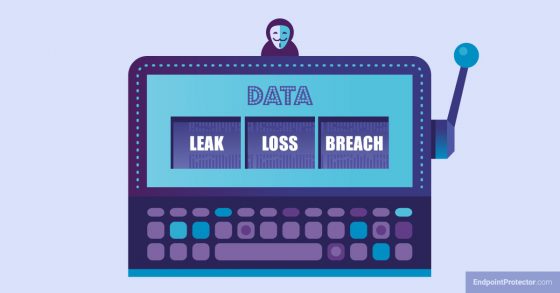
The three terms are often used interchangeably, and in practice that’s usually fine. But understanding the distinction helps when building DLP policies, because the cause of an exposure determines the appropriate response.
Data loss refers to data becoming unavailable or inaccessible at the source. A failed hard drive with no backup. An accidentally deleted database. These scenarios are generally outside DLP’s scope, which focuses on preventing data from leaving rather than on recovery.
Data leakage focuses on the destination: data ends up somewhere it shouldn’t, whether intentionally or not. A misaddressed email. A file uploaded to a personal cloud account. A developer pushing credentials to a public repository. DLP is designed precisely for these scenarios.
A data breach typically implies malicious unauthorized access, usually as part of a cyberattack. The attacker gets in, extracts data, and leaves. DLP addresses the exfiltration part of that chain, but breach response involves considerably more.
The distinction that matters most for data loss prevention strategy is between inadvertent leakage, which is accidental and often driven by convenience, and intentional exfiltration, which is deliberate and driven by malice or financial incentive. Each requires a different policy response.
How DLP works
How does a data loss prevention system work in practice? Not as a single blocking mechanism. DLP runs as a continuous cycle across the full data lifecycle – and understanding how DLP works at each stage explains why policy design and tuning matter as much as the technology itself.
Step 1: Discover and classify
Before you can protect data, you have to know where it is. DLP tools scan endpoints, networks, and cloud environments to locate sensitive data and classify it by type and sensitivity level. In large organizations, sensitive data accumulates in unexpected places over time, which is why discovery is an ongoing function rather than a one-time scan.
Step 2: Monitor and inspect
Once data is classified, the system monitors how it’s used and where it moves. Content inspection happens through several methods, and detection accuracy depends heavily on which ones are applied:
- Regex patterns match structured data formats like credit card numbers, Social Security numbers, and IBANs.
- Exact Data Match (EDM) fingerprints specific records, such as a customer database, so those exact records can be detected even when copied into a different format.
- Indexed Document Match (IDM) fingerprints entire documents rather than individual records. This is useful for protecting contracts, source code files, or proprietary reports.
- OCR (Optical Character Recognition) detects sensitive text in images, scanned PDFs, and screenshots, which is increasingly important as users find creative ways to move data.
- Machine learning adds contextual detection for unstructured or ambiguous content, learning over time to reduce false positives.
Step 3: Analyze context
Content alone doesn’t determine risk. Context does. A sales manager downloading a client list at 9 a.m. from the office is routine. The same download at 11 p.m. from an unrecognized device in another country looks different. DLP systems factor in who the user is, what device they’re on, where the data is going, and whether the behavior fits their normal pattern.
Step 4: Enforce policy
When a violation is detected, the system responds. The response can range from sending an alert while allowing the action, to blocking the transfer entirely. Intermediate options include encrypting the data before transfer, quarantining the file, or prompting the user to provide a business justification. Every action is logged.
Step 5: Report, refine, and tune
Logs feed compliance reports and feed back into policy improvement. Policies that generate high false positive rates erode user trust and drown security teams in noise. Programs that succeed treat tuning as an ongoing responsibility, not a post-deployment afterthought.
Types of DLP solutions
The main types of DLP break down by where they’re deployed and which data channels they cover. Each addresses a different point where data can leave organizational boundaries.
Endpoint DLP runs directly on user devices via an agent. It monitors clipboard activity, printing, screenshots, USB transfers, and browser uploads. Because it operates at the source, endpoint DLP provides the most granular visibility into what users do with data locally.
Network DLP inspects traffic at the network level, covering email, HTTP/S, FTP, and messaging protocols. It acts as a content-aware filter on outbound data.
Cloud and SaaS DLP protects data in and moving through cloud environments. It scans uploads, monitors SaaS application activity, and enforces consistent policies across multi-cloud platforms.
Email DLP, though often grouped with network DLP, warrants separate mention. Email remains one of the most common channels for both inadvertent leakage and intentional exfiltration. Email DLP inspects outbound messages, attachments, and subject lines, with responses ranging from blocking to encryption to holding for review.
Data-at-rest and eDiscovery scans stored data on endpoints and servers to surface sensitive information already sitting in risky or uncontrolled locations, before a breach does it for you.
A quick illustration of how these layers work together: a financial analyst accesses a sensitive merger report stored on a cloud server (cloud DLP monitors access), opens it on their laptop (endpoint DLP monitors what they do with it locally), then tries to forward it to a personal email account (email DLP intercepts the outbound message). Each layer covers a gap the others can’t fully address.
Read more about the differences between data leak prevention and data loss prevention here.
Key DLP features and functionality
What is DLP software in terms of actual capabilities? Not all tools are built the same. The following DLP functionality separates effective implementations from frustrating ones.
Sensitive data identification engine
The quality of detection determines everything downstream. Rule-based detection using regex is reliable for structured data types like credit card numbers, but it misses unstructured sensitive content. A strong DLP tool combines regex with EDM, IDM, and ML-based detection. The last of these matters increasingly as data takes more diverse forms across more channels.
Device and media control
Granular control over USB drives, removable storage, and peripheral connections. This is often the first DLP capability organizations deploy, particularly those concerned about insider threats. Blocking USB access entirely is rarely practical. The more useful approach is contextual control: allow encrypted drives from approved vendors, block everything else.
Cross-platform support
Windows-only DLP leaves real gaps. macOS adoption in enterprise has grown significantly, and Linux servers frequently handle sensitive workloads. An organization running a mixed environment needs coverage across all three operating systems. This is worth verifying explicitly when evaluating tools, because many vendors still treat macOS and Linux as secondary considerations.
Cloud and web application control
Block or allow specific cloud storage services and SaaS applications. Shadow IT detection surfaces applications employees are using without IT authorization, a common and often invisible source of uncontrolled data movement.
Enforcement action granularity
The range of available responses matters as much as detection accuracy. Block-only policies frustrate users and tend to get bypassed. A well-designed DLP tool offers a spectrum: monitor silently, alert and allow, require justification, encrypt before transfer, or block outright. Matching the response to the risk level reduces friction without sacrificing protection.
Reporting and audit trail
Full logging of data movement is required for compliance with most major regulations. It also provides the forensic detail needed when investigating an incident after the fact. Shadow copies of transferred files add another layer of post-incident visibility.
Integration
DLP events should feed into your SIEM for correlation with other security signals. Integration with SOAR enables automated response workflows. Ticketing system integration ensures incidents are tracked and remediated systematically rather than handled ad hoc.
Benefits and limitations of DLP
DLP solves real problems. It also creates new ones if deployed poorly. Being honest about both leads to a better implementation.
Benefits
Compliance support. DLP creates the monitoring, enforcement, and audit trail that GDPR, HIPAA, PCI DSS, and other frameworks require. It doesn’t achieve compliance on its own, but it’s a central component of any credible compliance program.
Intellectual property protection. Source code, product designs, and financial models can leave an organization through a single misdirected email or an unmonitored USB transfer. DLP provides visibility and control over those channels.
Faster incident response. Real-time alerts and full audit logs reduce the time between a policy violation and a response. For regulated data, detection speed directly affects breach notification timelines.
Data flow visibility. Many organizations don’t fully understand where their sensitive data lives until DLP scans surface it. That visibility has value independent of the enforcement function.
Financial risk reduction. Prevention is measurably cheaper than breach response. The $4.44 million average breach cost provides a concrete benchmark when making the business case for DLP investment.
Insider threat mitigation. DLP is one of the few controls that addresses both accidental and deliberate insider data movement. It doesn’t require assuming malicious intent to be effective.
Limitations
False positives. Overly broad or poorly tuned policies flag legitimate work, creating alert fatigue for security teams and friction for users. Any organization deploying DLP should budget time for a dedicated tuning period, particularly in the first 90 days.
Complexity. Mapping where all sensitive data actually lives across endpoints, cloud services, and SaaS applications takes time and resources. In large or acquisition-heavy environments, the data landscape changes faster than policies can track.
Implementation and maintenance costs. DLP isn’t set-and-forget. Agent deployment, policy updates, and ongoing tuning all require dedicated attention. The operational cost is as important to plan for as the licensing cost.
User friction. Blocking legitimate transfers damages the relationship between IT and business teams. Calibrating enforcement to match actual risk levels, rather than applying maximum restriction everywhere, is essential to maintaining user trust.
These limitations are manageable. Organizations that deploy DLP expecting it to run silently in the background will be disappointed. Organizations that treat it as a program requiring ongoing attention will get real value from it.
Real-World Case Study: Securing Patient Data at Haßberg Kliniken
Haßberg Kliniken is a network of hospitals in Germany’s Haßberge district, managing patient care data, PHI, and PII across two locations – with a small IT team and no dedicated data security function.
The operational challenge
Digital patient records are more mobile than paper ones. An employee copying files to a personal USB drive is an exposure scenario antivirus doesn’t catch and a firewall can’t prevent. They needed device-level control without the overhead of a complex deployment.
The solution: granular device control
They deployed Endpoint Protector’s Device Control module. It blocks unauthorized USB connections, permits only trusted or auto-encrypting devices, and gives administrators central policy control across all endpoints with client-specific rules where needed.
In their own words
“We chose Endpoint Protector due to the various setting options for devices, as well as the central control of rights for all clients and the client-specific setting options.” – Jörg Behm, IT Manager
What this means for your organization
You don’t need a large security team to run DLP effectively. The right scope, applied to the right risk, is what makes a deployment stick. In its customer review, Haßberg Kliniken rated Endpoint Protector with a high score across functionality, installation, and support.
DLP and compliance
DLP is a natural fit for organizations with regulatory obligations, because it addresses exactly what those frameworks require: documented evidence that sensitive data is protected, monitored, and controlled.
- GDPR requires protection of personal data and restrictions on cross-border transfers. DLP enforces data handling policies and monitors movement across jurisdictions.
- HIPAA requires safeguards for PHI. DLP prevents unauthorized sharing of patient records and provides the audit trail that auditors expect.
- PCI DSS requires protection of cardholder data. DLP detects and blocks credit card numbers in transmission and at rest.
- NIST CSF maps to DLP through the Protect and Detect functions of the framework.
- CCPA/CPRA protects California consumer data including SPI. DLP identifies and controls relevant data flows.
- LGPD places data controller obligations on organizations similar to those under GDPR. DLP supports those requirements in the same ways.
A note on scope: DLP supports compliance programs, but it doesn’t complete them. Data governance, access controls, employee training, and incident response procedures are all required alongside it.
DLP best practices
A good DLP deployment starts long before the first policy is written.
Conduct a data risk assessment first. Understand what sensitive data you hold, where it lives, and who has access to it. Without that baseline, policy writing is guesswork.
Classify data before writing policies. DLP policies are only as precise as your data classification. Investing in even a simple three-tier classification system upfront pays dividends across the entire program.
Start narrow, then expand. Deploy to the highest-risk data types and channels first. Trying to protect everything from day one results in alert overload and policy exceptions that undermine the program.
Deploy in monitor-only mode before blocking. Observe real data flows before restricting them. What looks like a policy violation in theory may be a legitimate business process in practice.
Train your teams. Most data leaks are accidental. When employees understand why DLP policies exist and what the consequences of a breach actually are, compliance improves without additional enforcement.
Integrate with your existing stack. DLP events that feed into your SIEM provide context. SOAR integration enables automated responses. Isolated DLP is less effective than DLP woven into a broader security program.
Treat tuning as ongoing work. Policies become stale as the business changes. New SaaS tools, acquisitions, remote work expansion, and AI adoption all create new data flows that existing policies may not cover.
DLP vs. related security technologies
DLP sits in a crowded security stack. Understanding where it starts and stops, and how it relates to adjacent tools, prevents both gaps and redundancy.
DLP vs. DSPM (Data Security Posture Management)
DLP acts on data as it moves: it monitors, inspects, and enforces policy in real time. DSPM answers a different question entirely: where does sensitive data live, who has access to it, and what is the overall risk posture? DSPM identifies and prioritizes data risk, while DLP enforces policies as sensitive data moves. They complement each other well, and in mature programs you’ll often see both deployed together.
DLP vs. CASB (Cloud Access Security Broker)
CASB controls which cloud applications employees can use and enforces access policies on those applications. DLP controls what data can pass through them. CASB decides who gets into the cloud app; DLP decides what they can take out. When integrated, CASB handles application-level control and DLP handles content-level control.
DLP vs. EDR (Endpoint Detection and Response)
EDR monitors endpoint behavior for signs of malware, exploits, and attacker activity. DLP monitors what users do with data on those same endpoints. They often share agent infrastructure, but they address different threat vectors. EDR catches attackers; DLP catches data movement.
DLP vs. UEBA (User and Entity Behavior Analytics)
UEBA identifies anomalous user behavior patterns that may signal insider threat or compromise. DLP enforces specific data policies. The two are most powerful when integrated: UEBA context, such as a user downloading unusually large volumes of files, can trigger higher-sensitivity DLP rules for that user automatically.
DLP and SIEM
DLP generates rich data movement telemetry. SIEM correlates it with other security signals to build a fuller picture of incidents. Feeding DLP events into a SIEM is standard practice in mature security operations, and increasingly important as organizations align with frameworks like SOC 2, ISO 27001, and DORA.
History and evolution of DLP
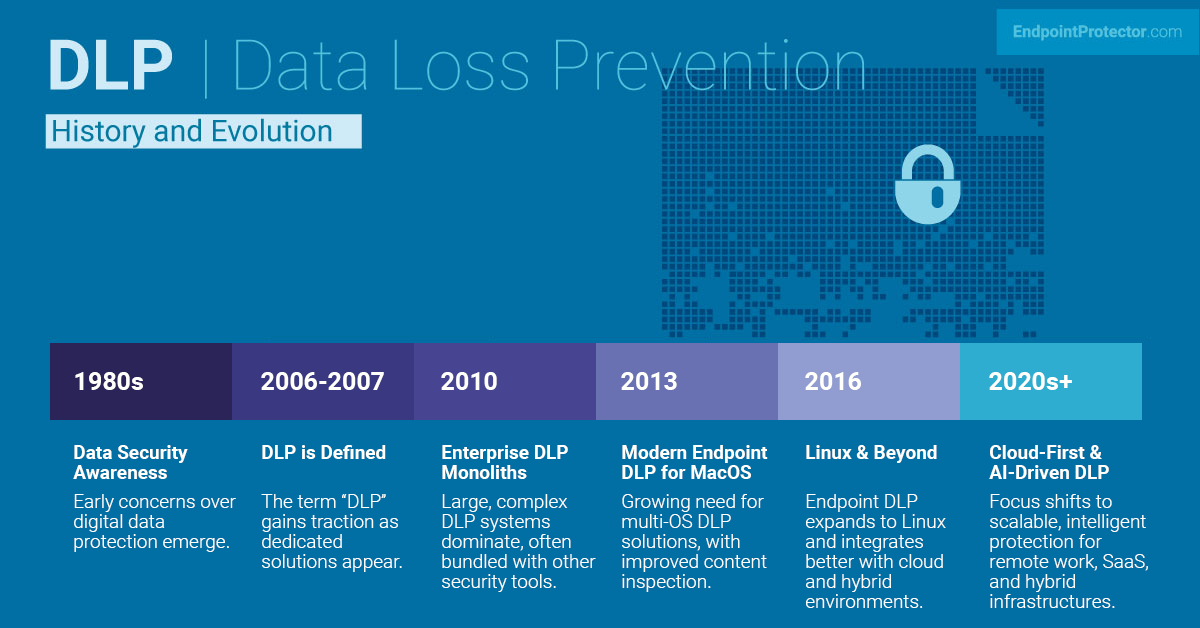
Data security in the 1980s and 1990s meant perimeter security. Firewalls and access controls were the primary tools, built on the assumption that controlling who got into the network was enough. That assumption eroded quickly as insider incidents became harder to ignore and data began moving in far more directions than any perimeter could cover.
The early 2000s brought the first specialized point solutions: email security tools, USB blocking software, and document rights management products. The term “DLP” gained traction around 2006 and 2007, when early tools relied on regular expressions to match structured data formats. They were useful but brittle, generating high false positive rates and requiring constant maintenance as data types changed.
From 2008 to roughly 2014, large security vendors bundled DLP into broader suites. These monolith solutions were powerful on paper and difficult in practice. Many organizations bought them and left them partially configured. The market eventually split between niche integrations and focused endpoint-and-content-aware tools – and the latter path is where the most useful progress happened.
From 2020 onward, DLP moved cloud-native. SaaS coverage improved significantly, SASE integration extended policies to remote workers, and machine learning made unstructured data detection more accurate. Today’s frontier is AI-aware DLP: not just detecting that a file is moving, but understanding whether the content going into a generative AI prompt contains sensitive data that shouldn’t be there.
The future of DLP
Several trends are shaping the future of DLP.
Machine learning will continue to displace static rule sets for content detection. The accuracy improvements are significant, and the operational overhead is lower than managing large regex libraries manually. Organizations still relying primarily on rule-based detection will find the transition worthwhile.
GenAI-specific DLP policies will become standard. Today they’re an emerging capability. Within a few years, tools that can’t inspect prompts sent to large language models will have a visible gap that security teams can’t ignore. Expect this to be a primary purchasing criterion in enterprise DLP evaluations.
Unified data protection platforms are consolidating DLP with DSPM, CASB, and UEBA into integrated solutions. Fewer agents, a single policy engine, and correlated visibility across all data channels. The complexity reduction is real, though consolidation also introduces vendor dependency worth factoring into platform decisions.
IoT and edge computing will extend the problem. As more devices generate, process, and transmit sensitive data outside the traditional endpoint model, DLP coverage will need to follow. Organizations building IoT-heavy infrastructures should factor this into their platform decisions now rather than retrofitting coverage later.
The fundamental tension in DLP’s evolution has always been the same: balancing protection with productivity. The tools get better. The challenge of deploying them well doesn’t go away.
Netwrix Endpoint Protector: DLP for real-world environments
Endpoint Protector by Netwrix is a cross-platform DLP solution designed to protect sensitive data across Windows, macOS, and Linux endpoints through device control, content-aware DLP, enforced encryption, and endpoint discovery. It addresses the full lifecycle of data protection – from finding sensitive data before it’s exposed, to controlling how it moves, to enforcing encryption when it needs to leave the organization.
The solution is built around four modules that can be deployed together or independently depending on where your risk is highest.
Device Control provides granular control over USB ports and connected devices. Policies can be set by vendor ID, product ID, serial number, or user group, so teams can allow trusted devices while blocking everything else. It’s often the fastest capability to deploy and one of the highest-impact for insider threat scenarios.
Content-Aware Protection monitors and controls file transfers across email, cloud applications, and messaging platforms. It inspects both content and context, with the ability to block, log, or apply policy based on what data contains rather than just its format. IP detection uses N-gram-based text categorization to identify source code and other intellectual property accurately across hundreds of file types.
Enforced Encryption automatically encrypts data moved to USB storage devices. Password-based and designed for everyday use, it keeps data protected in transit without requiring users to change their workflow.
eDiscovery scans data stored on endpoints to find sensitive information – PII, PHI, regulated data – already sitting in risky or uncontrolled locations. This is the discovery foundation that makes the rest of the program work: you can’t protect what you haven’t found.
Endpoint Protector by Netwrix deploys as SaaS, cloud, or virtual appliance and integrates with existing infrastructure. Compliance coverage includes HIPAA, PCI DSS, NIST, GDPR, CCPA, SOX, and others.
Frequently Asked Questions
Download our free ebook on
Data Loss Prevention Best Practices
Helping IT Managers, IT Administrators and data security staff understand the concept and purpose of DLP and how to easily implement it.