Endpoint and hybrid DLP software protects sensitive data on employee devices as it moves through USB drives, browser uploads, personal email, printers, and AI tools. This guide profiles seven platforms, including Netwrix Endpoint Protector, Forcepoint, Purview, Symantec, Proofpoint, Teramind, and Cyberhaven, outlining what each solution offers to help you compare your options and narrow down the right fit.
Data leaks through endpoints every day, such as when a contractor uploads a spreadsheet to a personal cloud account to work from home, or when an employee pastes a chunk of source code into an AI assistant to debug it. USB drives, browser uploads, personal email, local printers, messaging apps, and generative AI tools all offer ways around company controls, and hybrid work has made moving between them routine.
Left unmonitored, everyday device interactions like these are often where sensitive data slips out, and where an organization’s data loss prevention (DLP) platform needs to prove itself.
But not every platform marketed as DLP solution protects the same attack surface, so when comparing DLP software vendors, it pays to get precise about scope. This buyer’s guide covers endpoint and hybrid DLP software: tools that protect data where it is created, stored, and moved on employee devices, across operating systems and channels. It does not cover cloud-native Cloud Access Security Broker (CASB) platforms or network-layer DLP appliances, and it leaves out suites like Fortra DLP and Digital Guardian, since they belong to a different category.
Below, you’ll find evaluation criteria, vendor profiles, and a quick-reference comparison table to help you evaluate the best DLP solutions on the market and choose the right fit for your environment.
What to look for in DLP solutions
Use the following criteria to evaluate which data loss prevention software vendors match your operational stack and security requirements:
- Coverage scope: Which channels does the platform protect, such as email, web, cloud applications, endpoints, and removable media? A platform that covers only one or two channels leaves the rest of your attack surface unmonitored.
- OS support: Does it protect data the same way on macOS and Linux as on Windows, or does it restrict advanced policies to Windows endpoints? Mixed fleets need consistent, cross-platform policy enforcement.
- Deployment flexibility: Can you run the platform as Software as a Service (SaaS), in private cloud, on-premises, or as a virtual appliance? Your infrastructure and compliance posture usually decide this for you.
- Content inspection depth: Is detection limited to basic pattern matching, or does the platform add context, such as user behavior, risk scoring, or data lineage, to identify what’s genuinely sensitive? Depth determines how much you catch and how many false positives you tune out later.
- Policy enforcement actions: Does the platform actively block, encrypt, or remediate risky activity, or does it primarily alert and leave the response to your team? The difference determines how much manual work falls on your team after something is detected.
The best DLP software in 2026
Here is a curated list of the top DLP solutions, evaluated against our core criteria.
1. Netwrix Endpoint Protector
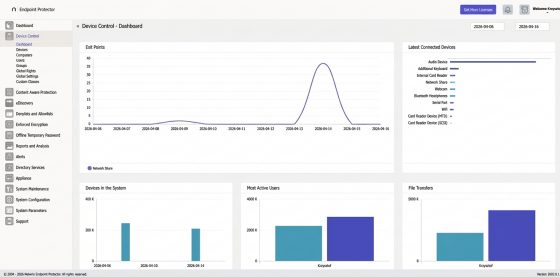
Netwrix Endpoint Protector provides multi-OS endpoint data protection with granular device control, content inspection, and enforced encryption. It supports Windows, macOS, and Linux endpoints with the same policies enforced across each. Policies are also active offline, which means that they apply even when the endpoint is disconnected. Deployment options span SaaS, cloud environments, and virtual appliances.
Key features
- Genuine cross-platform support for Windows, macOS, and Linux, with the same policies enforced on each.
- Content-aware protection applies contextual scanning across applications, browsers, messaging apps, AI tools, with extensive file type coverage.
- Device control and enforced encryption apply granular rules to USB, Bluetooth, printers, and more than 40 peripheral types.
- DLP policies apply even when devices are disconnected from the network or operate in air-gapped environments.
- Scans endpoints for sensitive data at rest and remediates it through encryption, deletion, or relocation.
See Endpoint Protector's DLP Software in Action
Discover, monitor, and protect sensitive data across Windows, macOS, and Linux endpoints - start a free trial and see real-time DLP protection for yourself.
Get Free Tral2. Forcepoint DLP
Forcepoint DLP protects sensitive data across cloud, web, email, and endpoint channels, all managed from a single console. The platform deploys as SaaS or on-premises and extends visibility into how sensitive data is shared with generative AI tools.
Key features
- Risk-adaptive protection adjusts enforcement dynamically based on user behavior and risk scoring, rather than static policy rules alone.
- Protects sensitive data across cloud, web, email, and endpoint channels, covering data at rest, in motion, and in use.
- Pre-built classifiers and policy templates aligned with common regulatory frameworks, including GDPR and HIPAA.
- Visibility and control over sensitive data shared with generative AI platforms.
3. Microsoft Purview DLP
Microsoft Purview DLP is built into Microsoft 365 ecosystem, extending data protection across the tools employees already use daily, without introducing a separate platform. It applies a single policy framework across Microsoft 365 services and endpoints, and uses deep content inspection to identify sensitive data.
Key features
- Native integration across Microsoft 365 services and Windows and macOS endpoints, enforced from a single policy framework.
- Deep content inspection identifies sensitive data beyond basic keyword matching.
- Adaptive protection adjusts enforcement based on user risk signals.
- Extends coverage to generative AI tools, helping prevent sensitive data from being shared with public AI platforms.
4. Symantec DLP (Broadcom)
Symantec DLP, from Broadcom, is an enterprise platform that protects sensitive data across a broad range of channels, including endpoints, network traffic, and cloud applications. It supports Windows, macOS, and Linux endpoints, and can deploy on-premises or in the cloud depending on an organization’s infrastructure requirements.
Key features
- Content-aware detection combines machine learning, fingerprinting, and OCR to classify sensitive data, including image-based and unstructured content.
- Protects data at rest, in motion, and in use across endpoint, network, and cloud channels.
- Centralized policy management applies consistent rules across all supported channels.
- Extends visibility into cloud application usage through broader platform integrations.
5. Proofpoint DLP
Proofpoint DLP is a cloud-native platform that extends the same detection and policies across email, cloud, and endpoint channels. It ties data loss incidents to the people behind them, combining behavior and threat signals with content inspection to separate routine activity from genuine risk.
Key features
- People-centric detection combines content inspection with user behavior and threat context to identify risky activity, rather than relying on content rules alone.
- Built-in classifiers and detectors, including OCR, support common data types alongside custom classification needs
- Extends visibility into insider risk, helping distinguish negligent, compromised, and malicious user activity.
- A single lightweight agent and console reduce the overhead of managing multiple point tools.
6. Teramind
Teramind approaches data loss prevention through an activity-monitoring foundation, layering policy-based controls on top of behavioral insight into how employees interact with data. The platform is available as a cloud or on-premises deployment.
Key features
- Behavioral analytics establishes a baseline for normal user activity, helping flag unusual or risky behavior beyond simple pattern matching.
- Content-based rules control data sharing across clipboard, file transfers, email, and messaging channels.
- Session recording and detailed activity logs support forensic investigation after an incident.
- Real-time alerts and automated blocking help stop data loss as it happens.
7. Cyberhaven
Cyberhaven takes a lineage-based approach to data protection, distinguishing itself from traditional content-matching DLP tools. It’s delivered as a cloud-based platform, with no on-premises infrastructure to manage.
Key features
- Data lineage tracking follows sensitive data from its origin through every copy, edit, and share, even after encryption, helping reduce false positives that content-matching alone can create.
- Extends visibility into insider risk, correlating data movement patterns with user behavior.
- Covers a broad range of exfiltration channels, including cloud apps, SaaS platforms, endpoints, removable media, and generative AI tools.
- Policies can be tested against historical data before being deployed, helping teams tune rules without disrupting live traffic.
DLP software comparison table
Use this quick-reference data loss prevention software comparison table to compare deployment models, operating system coverage, key strengths, and pricing structures for leading platforms.
| Vendor | Deployment | OS support | Key strength |
| Netwrix Endpoint Protector | SaaS, cloud, virtual appliance | Windows, macOS, Linux | Cross-platform endpoint DLP with offline enforcement |
| Forcepoint DLP | Cloud, on-premises | Windows, macOS | Behavior-based, risk-adaptive enforcement |
| Microsoft Purview DLP | Cloud (M365-native) | Windows, macOS | Native Microsoft 365 integration |
| Symantec DLP (Broadcom) | On-premises, cloud | Windows, macOS, Linux | Deep content inspection across endpoint, network, and cloud |
| Proofpoint DLP | Cloud | Windows, macOS | People-centric detection tied to user behavior |
| Teramind | Cloud, on-premises | Windows, macOS, Linux | Behavioral analytics layered with DLP controls |
| Cyberhaven | Cloud | Windows, macOS, Linux | Data lineage-based detection |
Closing thoughts
There’s no single DLP tool that fits every organization. The right pick comes down to your OS mix, how you want to deploy, and how each platform detects and enforces policy.
If you’re running Windows, macOS, and Linux side by side and need policies that hold even when a device drops offline, here’s where Netwrix Endpoint Protector fits in.
Frequently asked questions
Which is the best DLP software for enterprises?
The best software for data loss prevention depends on your environment and priorities. Consider operating system coverage, deployment model, which channels the platform protects, how it approaches detection, and whether it actively blocks and remediates risky activity or primarily alerts your team.
What is the difference between endpoint DLP and cloud DLP?
Endpoint DLP protects data directly on employee devices, controlling local data movement and transfers to removable media, and inspecting data before it leaves the endpoint, even when the device is offline. Cloud DLP monitors data stored within cloud applications and SaaS tools. Regulated organizations usually need both.
How much does DLP solution cost?
Most enterprise DLP tools are quote-based with no public pricing. Microsoft Purview baseline DLP comes with M365 E3; endpoint DLP and Adaptive Protection require E5 or the E5 Compliance add-on. Teramind’s DLP tier runs roughly $32/user/month, notably higher than its entry-level monitoring tier. Dedicated endpoint DLP platforms typically charge per endpoint.
Is Microsoft Purview DLP enough on its own?
Purview DLP works well for organizations that are standardized on Microsoft 365, but “enough on its own” depends heavily on licensing: endpoint DLP requires E5 or the E5 Compliance add-on, not just E3. Even on E5, it has no Linux endpoint support at all, and while macOS support has improved, it still lags windows in activity-type coverage. Mixed-OS environments need a dedicated endpoint DLP tool alongside it.
Which DLP solution works on macOS and Linux?
Netwrix Endpoint Protector is one of the few enterprise DLP tools that provides policy parity across Windows, macOS, and Linux. Many competing platforms treat Windows as primary and macOS as secondary, with Linux coverage either absent or limited.
What should I look for in DLP software for regulated industries?
Prioritize pre-built compliance templates, audit-ready reporting with adequate log retention, offline enforcement for mobile or air-gapped devices, and content inspection that covers the file types and channels your organization uses. Time to first enforced policy is also important.
Download our free ebook on
Data Loss Prevention Best Practices
Helping IT Managers, IT Administrators and data security staff understand the concept and purpose of DLP and how to easily implement it.